
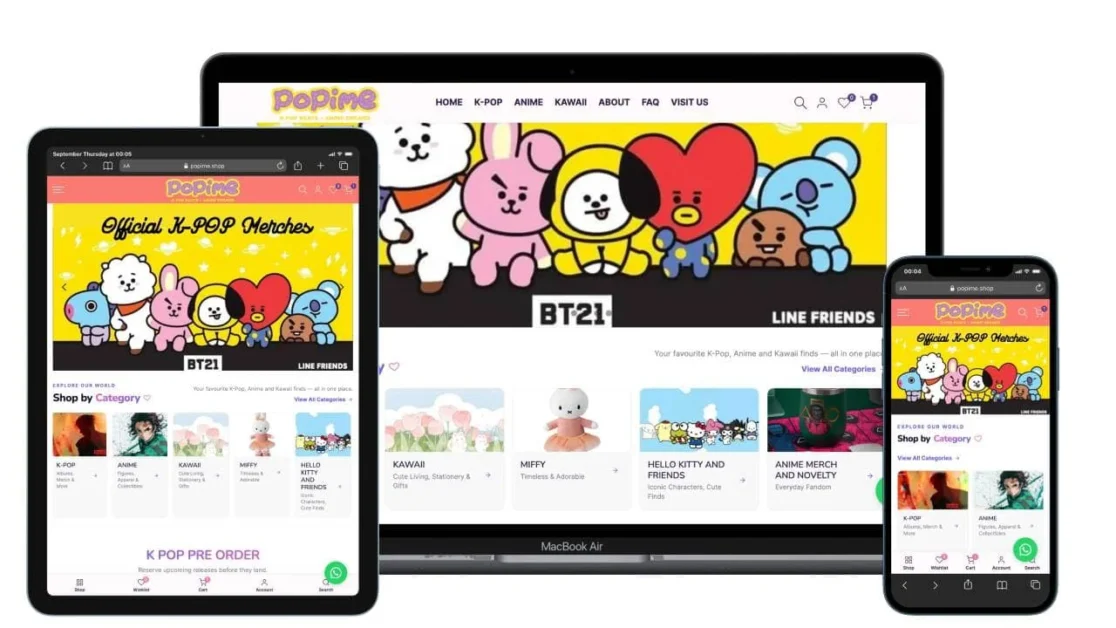
This Shopify Store Development Case Study looks at how I developed Popime, an Australian eCommerce store specialising in K-pop albums, anime collectibles and kawaii merchandise.
The project required more than creating an attractive storefront. Popime needed an eCommerce structure capable of handling a varied product catalogue, album versions, pre-orders, artist-based browsing, physical-store customers, Click & Collect and Australia-wide online sales.
The result is Popime — a Shopify store that connects the brand’s physical presence in Buddina on Queensland’s Sunshine Coast with a nationwide online shopping experience. The current store includes dedicated K-pop, anime and kawaii navigation, pre-orders, product variants, wishlist and comparison functionality, customer accounts, Click & Collect and Australia-wide delivery.
Author: Arul M Joseph — WordPress, Shopify & Laravel developer with 14+ years of experience and 500+ websites delivered. Portfolio and development services are available at arulmjoseph.com.
Quick Summary: Shopify Store Development Case Study
This Shopify Store Development Case Study demonstrates how a specialist retail business can be structured on Shopify without reducing the customer experience to a generic product catalogue.
Project at a glance
| Area | Implementation |
|---|---|
| Platform | Shopify |
| Business | Popime |
| Market | Australia |
| Industry | K-pop, Anime & Kawaii Collectibles |
| Store model | Physical retail + eCommerce |
| Product structure | K-pop albums, pre-orders, light sticks, merchandise, anime figures, blind boxes and kawaii products |
| Navigation | Category, product type, artist and brand-led discovery |
| Product options | Multiple album/product versions where applicable |
| Shopping features | Search, wishlist, compare, quick view and customer accounts |
| Fulfilment | Australia-wide shipping + Click & Collect |
| Local presence | Kawana Shoppingworld, Buddina, Queensland |
| Development focus | UX, catalogue architecture, responsive design, Shopify development and search visibility |
The key lesson from the project is simple: a specialist Shopify store should be organised around how its customers actually shop.
A K-pop customer may search by artist, album, version or pre-order status. An anime collector may shop by franchise or product type. A kawaii customer may start with a character or brand.
The storefront therefore needed multiple paths into the catalogue rather than one large “Shop” page.
The Challenge: Building a Shopify Store for Three Connected Product Categories
The main challenge in this Shopify Store Development Case Study was information architecture. Popime sells related products, but K-pop, anime and kawaii customers do not necessarily browse in the same way.
The live catalogue illustrates this clearly. K-pop navigation includes Pre-Order, Albums, Light Sticks, Merch and artist-specific collections, while anime is separated into areas such as figures, blind boxes and merchandise. Kawaii products can be explored through brands and characters including Hello Kitty, Miffy and Snoopy.
Why catalogue architecture matters
eCommerce information architecture is the way products, collections, navigation and supporting content are organised so shoppers can find what they want.
Consider a customer looking for a Stray Kids album.
They might think:
- “I want a Stray Kids album.”
- “I want the new release.”
- “I need the THIS BLACK version.”
- “What K-pop albums are available?”
- “What can I pre-order?”
- “I want a gift for a Stray Kids fan.”
All of those searches could eventually lead to related products, but the customer’s starting point is different.
That is why I approached the store around customer discovery paths, rather than simply displaying products in upload order.
The three main catalogue pillars
The primary structure became:
K-POP
- Pre-Orders
- Albums
- Light Sticks
- Merchandise
- Artist collections
ANIME
- Anime Figures
- Blind Boxes
- Anime Merchandise
KAWAII
- Character and brand collections
- Blind Boxes & Art Toys
- Other kawaii products
This creates a scalable hierarchy. New artists, franchises or product types can typically be added without rebuilding the entire navigation.
Shopify Store Development Case Study: Designing the Shopping Experience
A successful Shopify storefront needs to reduce the amount of thinking required between landing on the website and finding a suitable product. For Popime, that meant combining strong visual merchandising with practical eCommerce controls.
The live storefront currently exposes product prices, vendors, availability, variants and quick shopping actions directly within catalogue areas.
1. Designing for product discovery
Popime has products that can differ by:
- artist
- entertainment label
- album
- album version
- franchise
- character
- product type
- availability
- pre-order status
A flat catalogue would become difficult to navigate as inventory grows.
The collection structure therefore acts as an important layer between the homepage and individual product pages.
For example, the live K-pop catalogue includes dedicated artist paths for BTS, Stray Kids, ENHYPEN and ATEEZ alongside broader album and merchandise collections.
This allows both types of shoppers to browse efficiently:
| Shopper | Useful entry point |
|---|---|
| Knows the artist | Artist collection |
| Wants a new release | Pre-Order |
| Wants an album | K-Pop Albums |
| Wants a light stick | Light Sticks |
| Anime collector | Anime Figures / Merch |
| Character-focused shopper | Kawaii character collection |
| Unsure what to buy | Homepage merchandising/search |
2. Handling K-pop album versions
One technical detail that matters in K-pop retail is product variants.
A single album can have several editions. On the current Popime catalogue, products can expose options such as different album versions or member-specific versions. For example, some ENHYPEN products present member choices, while other albums expose multiple named versions.
A Shopify variant is a purchasable version of a product defined by one or more options.
Using variants correctly is important because creating every version as an unrelated product can make catalogues harder to manage and may create unnecessary duplication.
In practice, the product model needs to answer questions such as:
- Does each version have separate inventory?
- Does the price change by version?
- Does each version need its own image?
- Should random versions be represented differently?
- Can one edition sell out while another remains available?
These are small details from the customer’s perspective, but they have a major effect on catalogue administration.
3. Supporting pre-orders
Pre-orders are particularly relevant to K-pop because customers often want to reserve upcoming releases before local stock arrives.
Popime therefore gives K-POP PRE ORDER its own prominent catalogue area rather than hiding upcoming releases among normal products. The store describes this section as a way to reserve releases before they land.
From a UX perspective, pre-orders should be clearly distinguishable from immediately available stock.
Important information can include:
- release or expected availability information
- pre-order status
- version options
- inclusions
- pre-order benefits where applicable
- fulfilment expectations
The goal is to reduce ambiguity before checkout.
Connecting Popime’s Physical Store With Shopify
Popime is not an online-only business, so the Shopify experience also needed to support the relationship between the website and the physical shop.
Popime operates from Shop 507, Kawana Shoppingworld, Point Cartwright Drive, Buddina QLD 4575, and the website currently supports Click & Collect alongside Australia-wide shipping.
This changes how I think about an eCommerce build.
The website has two jobs:
National eCommerce
A customer elsewhere in Australia should be able to discover products, understand availability and place an order for delivery.
Local retail support
A Sunshine Coast customer may discover Popime through search, investigate products online, then visit the store or use Click & Collect.
That is why the website includes local-business information rather than behaving like an anonymous online catalogue.
Local trust information
The storefront identifies the Sunshine Coast location and provides the physical address, store information and Click & Collect messaging.
This helps connect three experiences:
Google/local discovery → website → physical store
and
Google/product discovery → website → online checkout
and
Existing local customer → website → Click & Collect
That hybrid structure was an important consideration in the project.
Building Trust Into the Store
Trust for Popime depends heavily on authenticity, fulfilment information and business transparency. Collectors want to understand what they are buying, while online customers need to know who is behind the store and how their order will be fulfilled.
The live website states that Popime sells official merchandise sourced through trusted brands and licensed suppliers. It also provides shipping, refund, privacy and terms pages.
Rather than relying only on generic trust badges, I prefer to build trust into the information architecture itself.
That includes:
- clear business identity
- physical-store details
- contact information
- product availability
- shipping information
- refund and returns information
- product variants
- pricing
- brand/vendor information
- customer account functionality
For a specialist collectibles store, this information can be more meaningful than adding multiple decorative “secure checkout” graphics.
Responsive Shopify Development and Performance
Responsive Shopify development means building the storefront so navigation, products, images and interactive controls remain usable across desktop, tablet and mobile devices.
For an image-heavy store such as Popime, performance also needs attention because product photography, promotional graphics and third-party functionality can gradually increase page weight.
Shopify’s own theme performance guidance recommends prioritising the Largest Contentful Paint image, avoiding unnecessary nested Liquid loops, rendering essential content in HTML/Liquid rather than relying on client-side JavaScript, and auditing unused scripts.
Shopify Liquid
Liquid is Shopify’s template language for dynamically rendering storefront content. Shopify’s official documentation describes it as the template language used to create themes and dynamically insert store information such as product titles, images and prices.
A simplified product-card pattern can look like this:
<article class="product-card">
  <a href="{{ product.url }}">
    {{
      product.featured_image
      | image_url: width: 700
      | image_tag:
        loading: 'lazy',
        widths: '320, 480, 700',
        alt: product.featured_image.alt
    }}

    <h3>{{ product.title }}</h3>

    <span>{{ product.price | money }}</span>
  </a>
</article>
This illustrates an important practical principle: let Shopify render essential product information directly whenever possible.
I avoid turning basic catalogue information into JavaScript-dependent UI without a good reason. Shopify specifically recommends rendering essential content in Liquid/HTML because shifting core content to client-side JavaScript can delay rendering and hurt search visibility.
A performance edge case beginners often miss
Lazy loading every image sounds like an optimisation, but it can actually hurt the main hero image.
Shopify recommends not lazy-loading the LCP image and suggests using fetchpriority=”high” for the primary above-the-fold image where appropriate.
For example:
{{
  section.settings.hero_image
  | image_url: width: 1800
  | image_tag:
    loading: 'eager',
    fetchpriority: 'high',
    widths: '750, 1100, 1500, 1800'
}}
Images further down the page can typically remain lazy-loaded.
This is a good example of why Shopify optimisation should be based on where an asset appears and how important it is, rather than applying the same rule everywhere.
SEO, AEO and GEO Foundations for Popime
SEO for a Shopify store is not simply adding keywords to product descriptions. The site architecture should help search engines understand the relationship between the business, its location, product categories, brands, artists and individual products.
For Popime, this means creating clear contextual signals around K-pop, anime, kawaii merchandise, Australia and the Sunshine Coast.
Secondary keywords
Three relevant secondary keyword themes for this project are:
- Shopify eCommerce development
- K-pop store Australia
- Shopify developer Australia
The store’s current homepage already establishes clear topical and geographic context by describing Popime as a Sunshine Coast, Queensland retailer of K-pop albums, anime figures and kawaii merchandise.
AEO: Answer Engine Optimization
Answer Engine Optimization is the practice of structuring information so search and answer systems can identify direct answers to user questions.
Useful examples for Popime include clearly answering:
- Where is Popime located?
- Does Popime ship Australia-wide?
- Does Popime offer Click & Collect?
- What does Popime sell?
- Are the products official?
- Can customers pre-order K-pop albums?
This is one reason dedicated About, FAQ, Visit Us and policy content matters.
GEO: Generative Engine Optimization
Generative Engine Optimization is the practice of making content easier for AI-powered discovery systems to understand, contextualise and potentially cite.
There is no special “AI ranking switch.” The practical approach is to provide clear entity information, useful original content, descriptive headings, consistent business facts and technically accessible pages.
For a store such as Popime, a clear statement like:
Popime is an Australian K-pop, anime and kawaii collectibles retailer with a physical store at Kawana Shoppingworld in Buddina, Queensland, and an online store serving customers across Australia.
is more machine-readable and useful than vague marketing copy such as “Your destination for everything you love.”
The second version can still work as branding, but it should not replace factual business information.
Step-by-Step: How I Approached the Popime Shopify Development
The practical development process started with understanding how customers would browse the catalogue, then translating those paths into Shopify collections, navigation, templates and merchandising components.
Step 1: Understand the catalogue
I first separate products into meaningful commercial groups rather than designing the homepage in isolation.
For Popime, the high-level entities were:
K-pop → Anime → Kawaii
Then each category could be broken down further by product type, artist, franchise or brand.
Step 2: Design the collection hierarchy
Collections provide landing pages between the homepage and products.
For example:
K-POP
├── Pre-Order
├── Albums
├── Light Sticks
├── Merch
├── Stray Kids
├── ENHYPEN
├── BTS
└── ATEEZ

ANIME
├── Figures
├── Blind Box
└── Merchandise

KAWAII
├── Hello Kitty and Friends
├── Miffy
├── Snoopy
├── Amufun
└── Blind Box & Art Toys
This structure closely reflects the navigation customers can use on the live store.
Step 3: Build product templates around real catalogue needs
The product experience must support ordinary products as well as products with multiple versions.
That means considering:
- product images
- title
- vendor
- price
- availability
- version selectors
- quantity
- add to cart
- supporting information
A K-pop album with seven member editions should not be treated exactly like a single anime figure with no selectable version.
Step 4: Build homepage merchandising
The homepage needs to expose major commercial areas quickly.
The current store surfaces sections such as K POP PRE ORDER and K POP ALBUMS, allowing customers to enter high-intent collections directly.
The goal is not to show every product on the homepage.
The homepage should help users decide where to go next.
Step 5: Add discovery features
The storefront includes:
- search
- wishlist
- product comparison
- quick view
- quick-add behaviour where appropriate
- customer accounts
These features provide alternative paths for users who do not navigate through the main collection hierarchy.
Step 6: Connect local and nationwide fulfilment
The site communicates both Click & Collect and Australia-wide delivery.
This ensures the Shopify storefront supports the wider business rather than functioning separately from the physical store.
Step 7: Review mobile UX and performance
Before considering a storefront finished, I review:
- navigation depth
- tap targets
- product-card readability
- variant selection
- image behaviour
- layout shifts
- unnecessary scripts
- collection density
- cart interaction
Shopify’s performance documentation recommends testing rather than relying on assumptions, and its official tooling includes Theme Inspector and Theme Check for identifying Liquid and theme-level issues.
Common Shopify Development Mistakes This Type of Project Should Avoid
The most common problem with specialist Shopify stores is not usually the checkout. It is poor catalogue organisation before the customer ever reaches checkout.
1. Putting everything under “Shop”
A single massive catalogue becomes harder to navigate as inventory grows.
Better: create logical category, artist, franchise and product-type paths.
2. Creating duplicate products for every version
Sometimes separate products are justified, but automatically creating a new page for every album version can make catalogue management unnecessarily complex.
Better: decide whether Shopify variants or separate products best represent inventory and customer search behaviour.
3. Designing only for desktop
Large mega menus and multi-column layouts can work well on desktop and become frustrating on mobile.
Better: treat mobile navigation as its own UX problem.
4. Installing an app for every small feature
Apps can add useful functionality, but every additional integration introduces another dependency and can add scripts or styling.
Shopify recommends auditing scripts and removing code that is not earning its performance cost.
5. Lazy-loading the hero image
Lazy loading is useful below the fold but can delay the primary visual when applied indiscriminately.
Shopify specifically recommends loading the LCP image eagerly.
6. Ignoring the physical store in SEO
For a hybrid retailer, hiding the store address deep inside a contact page wastes useful geographic context.
Popime clearly communicates its Buddina/Sunshine Coast presence while also explaining its Australia-wide service.
7. Writing vague homepage copy
Search engines, customers and AI systems all benefit from knowing what the business actually does.
Specific language such as K-pop albums, anime figures, kawaii merchandise, Sunshine Coast and Australia provides far more context than generic phrases such as “discover your favourites.”
FAQ: Shopify Store Development Case Study
What platform was used to build the Popime online store?
Popime was developed using Shopify. Shopify provides the core commerce platform, while the storefront experience can be customised through its theme architecture and Liquid templating system.
Can Shopify handle a large K-pop and anime catalogue?
Yes. Shopify can support specialist catalogues when products, collections, variants, navigation and metadata are structured carefully. The more important question is usually how the catalogue should be organised as inventory expands.
For Popime, separating K-pop, anime and kawaii products and then providing additional artist, product-type and brand paths makes the catalogue easier to explore.
Can Shopify support different versions of K-pop albums?
Yes. Shopify variants can represent different purchasable versions of a product when the inventory model fits Shopify’s product structure.
The correct setup depends on whether each version has its own inventory, price, imagery and availability. Popime’s live catalogue includes products where customers can choose between different named or member-specific versions.
Can Shopify support a physical store and an online store?
Yes. A Shopify implementation can combine online commerce with physical retail workflows. Popime uses its website to serve Australia-wide customers while also promoting its Sunshine Coast location and Click & Collect service.
How should I choose a Shopify developer for a similar project?
Look beyond screenshots.
A Shopify developer should understand catalogue architecture, Liquid, responsive UX, product variants, collection strategy, performance, SEO and third-party integrations in addition to visual design.
For a specialist retailer, ask the developer to explain how the store structure will continue working when the catalogue becomes significantly larger.
Conclusion: What the Popime Project Demonstrates
This Shopify Store Development Case Study demonstrates that good eCommerce development starts with understanding the business model and the way real customers search for products.
For Popime, the important requirement was not simply “build a colourful K-pop website.” The store needed to bring together three related but distinct product categories, support album variations and pre-orders, provide multiple product-discovery paths and connect a physical Sunshine Coast store with customers throughout Australia.
The final structure brings together:
- Shopify eCommerce development
- K-pop, anime and kawaii catalogue architecture
- product and version management
- pre-order discovery
- responsive shopping UX
- wishlist and comparison tools
- customer accounts
- Click & Collect
- Australia-wide shipping
- local-business signals
- SEO-friendly category architecture
- scalable Shopify theme development
For businesses planning a similarly complex Shopify store, I recommend starting with the catalogue architecture and customer journey before choosing homepage sections.
A beautiful interface can be redesigned later. Poor product architecture becomes increasingly expensive to fix once hundreds or thousands of products depend on it.
Project: View Popime Australia
Developer: Arul M Joseph
Services: Shopify Development · WordPress Development · Laravel Development · eCommerce UX · Technical SEO
Suggested internal links for arulmjoseph.com
Use these anchor texts naturally within the published case study:
- Shopify website development services
- experienced Shopify developer in India
- eCommerce website development services