Table of Contents
Quick Summary: Next.js WordPress in 60 Seconds
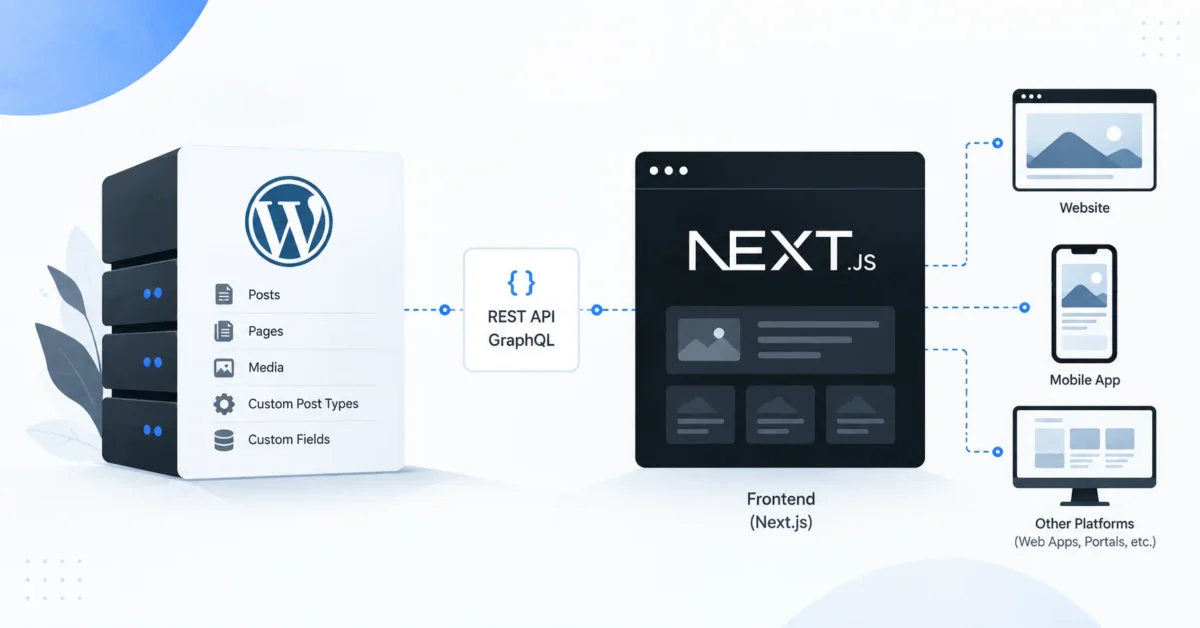
Next.js WordPress is a headless architecture where WordPress manages content while Next.js builds and renders the public-facing website. The two systems communicate through an API, usually the native WordPress REST API or GraphQL.
In a typical setup:
WordPress CMS → REST API or GraphQL → Next.js → Browser
The main advantage is separation. Editors retain WordPress for publishing, while developers gain much more freedom over frontend performance, design, application logic and deployment.
Key takeaways:
- WordPress remains the CMS for posts, pages, media, custom post types and structured fields.
- Next.js becomes the frontend instead of a PHP WordPress theme.
- Content can be retrieved through the WordPress REST API or WPGraphQL.
- Headless architecture can improve frontend flexibility and performance control, but it is not automatically faster or better for SEO.
- SEO metadata, redirects, previews, forms, search and caching need deliberate implementation.
- Headless WordPress is typically best for larger, custom or application-like websites rather than simple brochure sites.
What Is Next.js WordPress Headless Architecture?
Next.js WordPress headless architecture separates WordPress’s content-management system from the website visitors see. WordPress works as the backend CMS, while Next.js retrieves WordPress data and converts it into pages, layouts and interactive interfaces.
In traditional WordPress, the request normally follows this path:
Visitor
   ↓
WordPress
   ↓
PHP Theme
   ↓
Database
   ↓
Rendered HTML
A headless implementation looks more like this:
Content Editor
      ↓
┌────────────────────┐
│     WordPress      │
│ Posts              │
│ Pages              │
│ Custom Post Types  │
│ ACF Fields         │
│ Media              │
└─────────┬──────────┘
          │
    REST / GraphQL
          │
          ▼
┌────────────────────┐
│      Next.js       │
│ Components         │
│ Routing            │
│ Caching            │
│ Metadata           │
│ UI / Interactions  │
└─────────┬──────────┘
          │
          ▼
       Visitor
WordPress officially provides a REST API that exposes resources such as posts, pages, categories, tags and media as JSON. For example, published posts are available through /wp-json/wp/v2/posts. (WordPress Developer Resources)
This means Next.js does not need direct access to the WordPress database. It talks to WordPress through a defined API layer.
Headless WordPress vs Traditional WordPress
| Area | Traditional WordPress | Next.js + WordPress |
|---|---|---|
| CMS | WordPress | WordPress |
| Frontend | PHP WordPress theme | Next.js |
| Content API | Optional | Central to architecture |
| Page rendering | WordPress/PHP | Next.js |
| React development | Optional | Core frontend model |
| Plugin frontend output | Usually works directly | Often requires integration |
| Deployment | Usually one application | Usually CMS + frontend |
| Development complexity | Lower | Higher |
| Frontend flexibility | Good | Very high |
Neither approach is universally better. The right architecture depends on what the website needs to do.
Why Use Next.js with WordPress?
The biggest benefit of Next.js WordPress is that it combines WordPress’s mature editing experience with a modern application frontend. Developers can build the public website independently without forcing content teams to abandon the WordPress dashboard they already understand.
1. More Control Over Frontend Performance
With traditional WordPress, plugins, themes, PHP execution and database queries can all affect the response sent to visitors.
With a headless architecture, Next.js can retrieve content and apply an independent caching strategy.
For content that does not change on every request, this can reduce repeated calls to WordPress.
For example:
const response = await fetch(
  'https://cms.example.com/wp-json/wp/v2/posts',
  {
    next: {
      revalidate: 3600
    }
  }
);
The exact caching APIs depend on the Next.js version and configuration. Current Next.js documentation supports explicit caching and on-demand invalidation approaches, including cache tags and path revalidation. (Next.js)
This is particularly useful for a blog containing thousands of articles. You generally do not want WordPress and MySQL rebuilding every article from scratch each time somebody opens it.
However, headless does not automatically mean fast. A Next.js website can still perform badly if it ships excessive JavaScript, loads oversized images, makes unnecessary API requests or uses poorly configured caching.
2. Greater UI and Development Freedom
Your frontend is no longer restricted by a conventional WordPress PHP theme.
Developers can create reusable components such as:
components/
├── Header.tsx
├── Hero.tsx
├── ServiceCard.tsx
├── ArticleCard.tsx
├── Testimonial.tsx
└── Footer.tsx
This architecture works well when a website needs advanced filtering, dashboards, interactive product interfaces or highly customized experiences.
3. WordPress Remains Familiar to Editors
One of the strongest reasons to choose a WordPress headless CMS instead of replacing WordPress completely is editorial familiarity.
A team can continue managing:
- Posts
- Pages
- Categories
- Media
- Authors
- Custom post types
- Custom fields
- Drafts
Developers can change the frontend without forcing editors to learn a completely different CMS.
4. Content Can Serve More Than One Platform
Because content is available through APIs, WordPress can become a central content repository.
For example:
                WordPress
                    │
          ┌─────────┼──────────┐
          ▼         ▼          ▼
       Website   Mobile App   Portal
       Next.js    Native App   React
This becomes useful when an organization needs the same structured content across several digital products.
REST API vs GraphQL for Next.js WordPress
Most Next.js WordPress projects use either the native REST API or GraphQL. REST is simpler and built into WordPress, while GraphQL can provide more precise queries for complex relationships.
WordPress describes its REST API as an interface for applications to send and receive WordPress data using JSON. (WordPress Developer Resources)
A simple post request looks like:
GET https://cms.example.com/wp-json/wp/v2/postsIn Next.js:
export async function getPosts() {
  const response = await fetch(
    'https://cms.example.com/wp-json/wp/v2/posts'
  );

  if (!response.ok) {
    throw new Error('Unable to load WordPress posts');
  }

  return response.json();
}
Using WPGraphQL
WPGraphQL is an open-source WordPress plugin that adds an extensible GraphQL schema and API to WordPress. (WPGraphQL)
A query could request:
query GetPosts {
  posts {
    nodes {
      title
      slug
      date
      featuredImage {
        node {
          sourceUrl
        }
      }
    }
  }
}
The frontend receives only the fields requested.
| Requirement | REST | GraphQL |
|---|---|---|
| Built into WordPress | Yes | No |
| Easy initial setup | Excellent | Good |
| Simple blogs | Excellent | Excellent |
| Complex relationships | Good | Excellent |
| Precise field selection | Limited | Excellent |
| Extra WordPress plugin | No | Yes |
| Learning curve | Lower | Higher |
For a normal service website or blog, I typically start by asking whether GraphQL solves a real problem. Adding GraphQL simply because the project is “headless” creates unnecessary complexity.
For content with many custom relationships—for example properties, locations, agents, amenities and related listings—GraphQL may become much more attractive.
Is Next.js WordPress Good for SEO, AEO and AI Search?
Next.js WordPress can provide excellent SEO foundations, but headless architecture does not improve rankings by itself. Developers must deliberately recreate metadata, canonical URLs, sitemaps, structured data and other signals that traditional WordPress themes and SEO plugins may normally output automatically.
This is one of the biggest mistakes I see developers underestimate.
A WordPress SEO plugin may contain:
- SEO title
- Meta description
- Canonical URL
- Open Graph data
- Robots directives
- Schema information
But the visitor is viewing Next.js, not the WordPress theme.
The actual pipeline becomes:
SEO fields in WordPress
        ↓
REST API / GraphQL
        ↓
Next.js
        ↓
generateMetadata()
        ↓
HTML metadata
Next.js provides both static metadata and generateMetadata() for route-specific dynamic metadata. The official documentation states that dynamically generated metadata can depend on route parameters or externally fetched content. (Next.js)
For example:
export async function generateMetadata({ params }) {
  const post = await getPost(params.slug);

  return {
    title: post.seo_title || post.title.rendered,
    description: post.meta_description,
    alternates: {
      canonical: `https://example.com/blog/${params.slug}/`,
    },
  };
}
For SEO, AEO and GEO, I Would Explicitly Implement
- Semantic HTML headings
- Server-accessible article content
- Unique title and description
- Canonical URLs
- XML sitemap
- robots directives
- Open Graph metadata
- Author information
- Organization information
- Article structured data
- Breadcrumb structured data
- Relevant internal links
- Clear factual definitions
- Descriptive image alt text
For AI answer engines, clean architecture helps machines retrieve content, but there is no special “Next.js AI ranking boost.” Useful, original and clearly structured content remains more important than the framework used to render it.
How to Build a Next.js WordPress Website
A practical Next.js WordPress implementation starts by designing WordPress as a structured content backend rather than treating it as a traditional visual theme builder. Define what content exists, expose it through the API and then map those structures to reusable Next.js components.
Step 1: Set Up WordPress
A common production structure is:
www.example.com → Next.js
cms.example.com → WordPress
Configure:
- HTTPS
- Permalinks
- User roles
- Custom post types
- ACF/custom fields where required
- REST or GraphQL access
- Security and backups
Check REST availability:
https://cms.example.com/wp-json/WordPress documents /wp-json/ as its standard REST API base when pretty permalinks are enabled. (WordPress Developer Resources)
Step 2: Create a Structured Content Model
Avoid storing an entire website as one huge page-builder field.
A service might instead contain:
Service
├── Title
├── Introduction
├── Hero Image
├── Benefits
├── Features
├── FAQs
├── Testimonials
├── Related Services
└── SEO Fields
In practice, this is one of the differences that determines whether a headless project stays maintainable.
Across WordPress projects I have worked on, treating content as structured data makes frontend redesigns considerably easier. If testimonial, service and FAQ data have their own fields or content types, a Next.js developer can change the layout without rewriting the underlying content.
Arul M Joseph is a WordPress, Shopify and Laravel developer with 14+ years of development experience and 500+ websites delivered through arulmjoseph.com.
Step 3: Connect Next.js to WordPress
Centralize WordPress communication:
const WORDPRESS_URL = process.env.WORDPRESS_URL;

export async function getPosts() {
  const res = await fetch(
    `${WORDPRESS_URL}/wp-json/wp/v2/posts?_embed`,
    {
      next: { tags: ['wordpress-posts'] }
    }
  );

  if (!res.ok) {
    throw new Error('WordPress API request failed');
  }

  return res.json();
}
Avoid scattering API URLs throughout dozens of components.
A cleaner project might use:
app/
components/
lib/
  wordpress.ts
  seo.ts
  schema.ts
types/
Step 4: Plan Cache Invalidation
This is an edge case beginners often miss.
Imagine an editor changes a headline at 10:00 AM, but Next.js cached that article earlier. The WordPress dashboard says it is updated while the public page still shows the old version.
A better workflow is:
Editor clicks Publish
        ↓
WordPress webhook
        ↓
Secure Next.js endpoint
        ↓
Invalidate affected cache
        ↓
Fresh WordPress content fetched
Current Next.js documentation provides tag- and path-based cache invalidation tools for this kind of workflow. (Next.js)
Step 5: Build SEO Before Launch
Do not migrate first and discover missing SEO afterward.
Test:
- Existing URL preservation
- 301 redirects
- canonical tags
- title and descriptions
- sitemaps
- indexing directives
- Article schema
- breadcrumbs
- image URLs
- pagination
- 404 responses
A redesign that looks faster but accidentally changes hundreds of established URLs can create a much bigger problem than it solves.
Common Next.js WordPress Mistakes
Most headless WordPress problems come from treating the project as “WordPress with a React theme.” The frontend, publishing workflow, cache, metadata and integrations must instead be designed as separate but connected systems.
Assuming Every WordPress Plugin Will Work
Plugins that only manage backend data may work perfectly.
Plugins whose main job is rendering frontend HTML often will not.
Examples include some:
- page builders
- popup plugins
- frontend shortcode systems
- form plugins
- theme widgets
You may need to recreate their frontend behavior in Next.js.
Fetching WordPress on Every Request
Repeated uncached API calls can turn WordPress into a bottleneck.
Decide which content needs:
- caching
- timed revalidation
- immediate invalidation
- true request-time freshness
Ignoring Preview
Editors expect Preview to work.
Draft content usually requires authenticated requests and a Next.js preview/draft workflow rather than the normal publicly cached endpoint.
Assuming Headless Is Automatically More Secure
Separating the frontend can reduce direct exposure of parts of the WordPress presentation layer, but WordPress still needs security maintenance.
Keep WordPress core and plugins updated, use appropriate authentication, limit permissions, protect secrets and maintain backups.
Choosing Headless for a Five-Page Website
Headless adds:
- another application
- another deployment process
- API integration
- cache management
- preview implementation
- potentially higher development cost
For a simple local-business site, well-built traditional WordPress may be the more sensible architecture.
Frequently Asked Questions
Is Next.js better than WordPress?
Next.js and WordPress solve different problems. WordPress is primarily a CMS and publishing platform, while Next.js is a React framework for building web applications and websites. In a headless architecture, they can complement each other rather than compete.
Is headless WordPress faster than normal WordPress?
It can be, especially when pages are efficiently cached and delivered without repeating expensive WordPress processing. However, poor JavaScript, images, API design or caching can make a headless website slow as well.
Is Next.js WordPress good for SEO?
Yes, Next.js WordPress can support strong technical SEO when metadata, canonical URLs, structured data, internal links, sitemaps and crawlable content are implemented correctly. Headless architecture itself does not guarantee higher rankings.
Should I use REST API or GraphQL with WordPress?
For simpler websites, the built-in REST API is often enough. GraphQL becomes attractive when the frontend needs complex relationships or needs to request very specific nested datasets.
Can WooCommerce work with Next.js?
Yes, but headless WooCommerce is considerably more complex than a content-only WordPress project. Products are relatively straightforward; carts, sessions, customer accounts, checkout, payments, taxes, shipping and third-party extensions require much more architectural planning.
Conclusion: Should You Use Next.js with WordPress?
Next.js WordPress is most valuable when you need WordPress’s mature content-management experience but want greater control over the frontend architecture. It can be an excellent fit for high-traffic publications, sophisticated corporate websites, SaaS marketing platforms and websites that share structured content with multiple applications.
Choose it because the project needs capabilities such as:
- a highly customized React frontend
- structured reusable content
- advanced interactions
- independent frontend deployment
- sophisticated caching
- multi-channel content delivery
Do not choose headless simply because Next.js sounds more modern.
For a standard company website, traditional WordPress may remain simpler and more economical. For a project requiring application-like interfaces, structured content and greater frontend control, Next.js with WordPress can provide an excellent separation between content management and presentation.
Suggested Internal Links
For arulmjoseph.com, natural internal-link opportunities include:
- WordPress website development services
- custom WordPress development
- website performance and technical SEO services