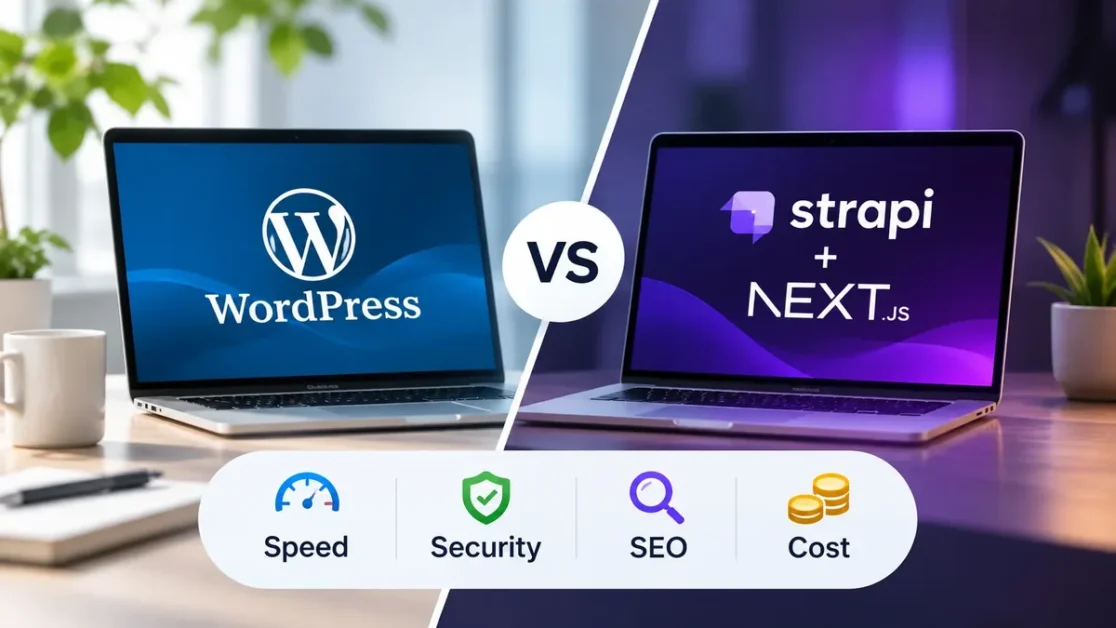
Choose WordPress if you need a website live fast, on a small budget, and your team wants to edit pages visually. Choose a headless CMS stack (Strapi + Next.js) if page speed, a smaller attack surface, a fully custom design, or sending content to apps as well as the web matter more than upfront cost. For a typical 10-page business website, headless costs about 2 to 3 times more to build, and yearly running costs come out roughly the same.
I’m Arul M Joseph, a WordPress, Shopify and Laravel developer with 14+ years of experience and 500+ websites delivered through arulmjoseph.com. I build WordPress, WooCommerce, Shopify and headless websites, and clients ask me the WordPress vs headless CMS question on almost every new project. This guide compares both on speed, SEO, security, editing and cost.
Table of Contents
Key Takeaways
- WordPress is a monolithic CMS: one PHP application stores content and renders pages.
- Strapi + Next.js is a headless (decoupled) stack: Strapi manages content, Next.js builds the pages, and the two talk through an API.
- Headless sites are fast by default because pages are pre-built and served from a CDN. WordPress reaches good speeds too, with tuning.
- Most WordPress security problems come from plugins, not core. Plugins accounted for 91% of new WordPress vulnerabilities in 2025 (Patchstack).
- Headless costs more to build (₹40,000 to ₹1,20,000 vs ₹15,000 to ₹45,000 in India) and about the same to run.
What Is the Difference Between WordPress and a Headless CMS?
WordPress is a traditional, or monolithic, content management system. A single PHP application stores your content in a MySQL or MariaDB database and also produces the HTML pages your visitors see.
A headless CMS such as Strapi only stores and manages content. It sends content out through REST or GraphQL APIs. A separate frontend, here Next.js, fetches the content and builds the pages. The “head” (the website) is detached from the “body” (the content system).
In practice, this means one Strapi backend serves a website, a mobile app and a smart display from the same content. With WordPress, the website and the content system live in one application on one server.
What Is Strapi?
Strapi is an open-source headless CMS built on Node.js. Its current major version is Strapi 5. It works with PostgreSQL, MySQL, MariaDB or SQLite, gives editors a clean admin panel, and is free to self-host.
What Is Next.js?
Next.js is a React framework maintained by Vercel. Version 16 is the current major release. It pre-renders pages at build time (Static Site Generation, SSG), refreshes them in the background (Incremental Static Regeneration, ISR), or renders them on each request (Server-Side Rendering, SSR).
WordPress vs Strapi + Next.js at a Glance
| Feature | WordPress (monolithic) | Strapi + Next.js (headless) |
|---|---|---|
| Architecture | Frontend, backend and database in one PHP application | Decoupled: API-first backend, separate frontend |
| Frontend technology | PHP themes, HTML, CSS, JavaScript (often jQuery) | React, Next.js, usually Tailwind CSS |
| Backend and database | PHP + MySQL / MariaDB | Node.js + PostgreSQL, MySQL, MariaDB or SQLite |
| How pages are delivered | Built by PHP on each request unless cached | Pre-rendered (SSG/ISR) and served from a CDN, or server-rendered |
| Speed and Core Web Vitals | Good with a light theme and caching. Often slowed by page builders and plugins | Fast with little effort: pre-built HTML, less JavaScript |
| SEO tools | Ready-made plugins (Yoast, Rank Math) | Built in code: meta tags, sitemap, schema, redirects |
| Editing experience | Gutenberg or Elementor with live visual editing | Structured forms in the Strapi admin. Live preview needs setup |
| Security exposure | Larger: plugins, themes, public login page | Smaller: public site is static, admin stays private |
| Maintenance | Frequent core, theme and plugin updates | Fewer but more technical updates (Node.js, Strapi, Next.js) |
| Build cost, 10 pages (India) | ₹15,000 to ₹45,000 | ₹40,000 to ₹1,20,000 |
| Best for | Brochure sites, blogs, small budgets, non-technical teams | Performance-critical sites, custom brands, multi-channel content |
Which Is Faster? Performance and Core Web Vitals
A headless Next.js site is usually faster out of the box. Next.js generates every page as static HTML at build time, or regenerates pages in the background as content changes. A global CDN such as Cloudflare or Vercel serves these files, so a page view runs no database query and no PHP. Good Core Web Vitals scores for LCP, INP and CLS become the default.
WordPress reaches good speeds too. A lightweight theme, page caching and a CDN put most sites in Google’s “good” range. The usual causes of a slow WordPress site are heavy page builders, plugin scripts loaded on every page, and low-cost shared hosting.
Keep expectations realistic. Page speed helps rankings and conversions, and it is one signal among many. Moving to headless will not, on its own, put a page at the top of Google. Content quality and search intent still come first.
SEO and AI Search Visibility (AEO and GEO)
Both stacks rank well in Google and get cited by AI search tools when they deliver complete, crawlable HTML. Google AI Overviews and AI assistants such as ChatGPT, Perplexity and Gemini read the HTML of your pages to find answers.
The risk with headless is a React site rendering content only in the visitor’s browser. Some AI crawlers don’t run JavaScript and see an empty page. For content pages, always use SSG or SSR in Next.js, never client-only rendering.
What Each Stack Needs for SEO
- WordPress: Yoast or Rank Math handle page titles, meta descriptions, XML sitemaps, canonical tags and basic schema out of the box.
- Strapi + Next.js: your developer builds these into the site with the Next.js Metadata API, a sitemap file and JSON-LD schema. This takes more work up front. The output is lean and nothing depends on plugin settings.
- Both: clear question-style headings, short direct answers near the top, comparison tables, FAQ and Article schema, a named author and visible “last updated” dates. AI engines quote these parts most often.
Is a Headless Website More Secure Than WordPress?
A headless website has a smaller attack surface than a standard WordPress site, because visitors never reach the CMS or the database. Headless still needs updates and monitoring.
Where WordPress Security Risk Comes From
WordPress core is well maintained. The risk lies in add-ons. According to Patchstack’s State of WordPress Security in 2026 report, researchers found 11,334 new vulnerabilities in the WordPress ecosystem in 2025: 91% in plugins, 9% in themes, and only six low-priority issues in core.
- Common attack routes: SQL injection (SQLi), cross-site scripting (XSS), brute-force attacks on /wp-login.php, and malicious file uploads into /wp-content/uploads/.
- Direct database link: in a standard setup, the public web server runs PHP code and queries the database on every uncached visit.
How Strapi + Next.js Reduces the Risk
- No public database or admin panel. Visitors only reach the Next.js frontend. Strapi and its database sit behind a firewall, VPN or IP allow-list, reached only with API tokens.
- Static pages leave nothing to inject. A pre-rendered page is plain HTML. No PHP code or database query runs when it loads.
- Fewer third-party add-ons. Strapi has a plugin marketplace, and a typical build uses few plugins. Developers write most features as explicit code (content types, controllers and policies).
- Role-based access control. Editors manage content. Only developers touch infrastructure.
Headless Is Not Risk-Free
Strapi and Next.js need security updates too. Next.js 16.2.6, released in May 2026, patched 13 security advisories in a single release (Makerkit summary). Contact forms, search and API routes still run server code.
Headless reduces the attack surface. It does not remove the need for updates and monitoring. A WordPress site with a few reputable, updated plugins, strong logins and a firewall stays well protected too.
Which Is Easier for Content Editors?
WordPress is easier for most editors. Editors see the page as they build it, drag blocks around, preview and publish. Most marketers and copywriters already know it.
Strapi stores content in structured fields: title, summary, image, sections. This keeps content consistent and reusable across the website and apps, and editing feels like filling in a form rather than designing a page.
Your developer has to connect a live visual preview to the frontend, and new layouts need developer time. Plan a short training session for your team.
How Much Does Each Cost? A 10-Page Website in 2026
A 10-page headless website costs ₹40,000 to ₹1,20,000 to build in India, against ₹15,000 to ₹45,000 for WordPress. Yearly running costs for both land between about ₹15,000 and ₹52,000.
One-Time Development Cost
| Item | WordPress | Strapi + Next.js |
|---|---|---|
| Scope | Theme setup, custom styling, plugin setup, 10 pages of content | Custom Next.js frontend, Strapi content types and fields, API integration, 10 pages of content |
| India (freelancer / agency) | ₹15,000 to ₹45,000 | ₹40,000 to ₹1,20,000 |
| International (freelancer / agency) | $500 to $2,000 | $1,500 to $5,000 |
Headless needs React and Next.js developers plus custom API work, so it costs more to build than a WordPress site based on a ready-made theme.
Yearly Running Cost (Hosting and Maintenance)
| Expense | WordPress | Strapi + Next.js |
|---|---|---|
| Frontend hosting | Included in the hosting plan | ₹0 on Cloudflare Pages or Netlify free tiers. Vercel Pro is $20/month (about ₹20,000/year) |
| Backend and database hosting | Shared or managed WordPress hosting: ₹3,000 to ₹12,000 ($40 to $150) | VPS such as DigitalOcean or Hetzner at $5 to $15/month: ₹5,000 to ₹15,000 ($60 to $180). Supabase or Neon free tiers often cover the database |
| SSL and CDN | Free (Let’s Encrypt, Cloudflare) | Free |
| Premium plugins and subscriptions | ₹3,000 to ₹15,000 ($40 to $200) for forms, caching, security | Usually ₹0. SEO, forms and caching live in code |
| Updates, backups and security | ₹10,000 to ₹25,000 ($150 to $400) | ₹10,000 to ₹30,000 ($150 to $400) for Node.js, Strapi and Next.js upgrades and backups |
| Estimated yearly total | ₹16,000 to ₹52,000 ($230 to $750) | ₹15,000 to ₹45,000 ($210 to $580), plus about ₹20,000 on Vercel Pro |
Vercel’s free Hobby plan is limited to non-commercial, personal use (Vercel Fair Use Guidelines). A business or client website needs Vercel Pro, or a host such as Cloudflare Pages or Netlify.
Bottom line: headless costs two to three times more to build and roughly the same to run. You choose it for speed, security and flexibility, not to save money. Figures are typical 2026 estimates and exclude the domain name.
WordPress or Headless CMS: Which Should You Choose?
Pick based on budget, launch date, your team’s editing habits and where your content goes. Use these lists as a checklist.
Choose WordPress If
- You need to launch in days rather than weeks.
- Your build budget is under about ₹45,000.
- Your team wants to change layouts visually without a developer.
- You rely on plugins for bookings, memberships, courses or similar features.
See our WordPress development service for packages.
Choose Strapi + Next.js If
- Page speed and Core Web Vitals directly affect your sales or leads.
- You want a smaller attack surface, or have dealt with a hacked WordPress site before.
- You need a fully custom, app-like design.
- The same content must feed a website, a mobile app or other channels.
- You have a developer on hand for ongoing updates.
See our web application development service for custom Next.js builds.
A Middle Path: Headless WordPress
Headless WordPress keeps the WordPress admin your editors already know and replaces only the frontend with Next.js. Content comes through the WordPress REST API or WPGraphQL. You get most of the speed benefit with familiar editing, and the WordPress backend still needs regular updates. Read our guide to Next.js with WordPress headless architecture for the details.
Frequently Asked Questions
Is a headless CMS better for SEO than WordPress?
Not automatically. Both rank well. Headless makes fast pages easier to achieve, while WordPress makes SEO settings easier through plugins like Yoast and Rank Math. Content quality, search intent and backlinks matter more than the CMS.
Is Strapi free to use?
Yes. The self-hosted Strapi Community edition is free and open source. You only pay for hosting. Strapi Cloud and paid plans add managed hosting and extra features.
Can non-technical people use Strapi?
Yes, for writing and editing content in its admin panel. Changing page layouts or adding new types of pages usually needs a developer, unlike a WordPress page builder.
Do I need Vercel to host a Next.js website?
No. Next.js also runs on Cloudflare, Netlify or your own Node.js server. Vercel’s free Hobby plan is for non-commercial personal use only, so business sites need the Pro plan or another host.
How long does it take to move from WordPress to Strapi + Next.js?
For a typical 10-page business site, plan for two to four weeks. This covers content modelling in Strapi, building the Next.js frontend, moving content, and setting up 301 redirects to keep your rankings.
Is WordPress still a good choice in 2026?
Yes, for most brochure sites, blogs and sites depending on plugins for bookings, memberships or courses. Keep it updated and run a small number of reputable plugins.
Will my website go down if the Strapi backend goes down?
Pages already pre-rendered and cached on the CDN stay online. New content, forms and any page fetching live data from the API stop updating until the backend is back.
Next Steps
There is no single winner in WordPress vs headless CMS. WordPress remains the fastest, most affordable way to get a manageable website online. Strapi + Next.js is the better foundation when speed, security and custom design justify a higher build cost. Start from your budget, your team and how your content gets used.
- List the features your site needs and check which ones depend on WordPress plugins.
- Run your current site through Google PageSpeed Insights to see where speed stands today.
- Contact me for a free 30-minute call and a fixed quote for your WordPress or headless website.
Sources: Patchstack: State of WordPress Security in 2026, Vercel: Fair Use Guidelines, Next.js 16 release notes, Makerkit: Next.js 16.2.6 security release summary.